Practical image workflow
Photo to Anime-Style Background Still
An anime-style background can turn a familiar street, bedroom, or landscape into a setting for a storyboard, thumbnail, or personal creative project. This guide focuses on painted scenery with readable perspective and atmosphere. Despite the legacy photo-to-animation address, the result is a still image: there is no animation or video engine in this workflow. The illustration is a background concept. The real capability is reference-led image generation, with model availability and output settings determined by the choices currently offered in the workspace.
Try this workflowA prompt is prefilled; generation requires sign-in and available credits. Review model cost before submitting.
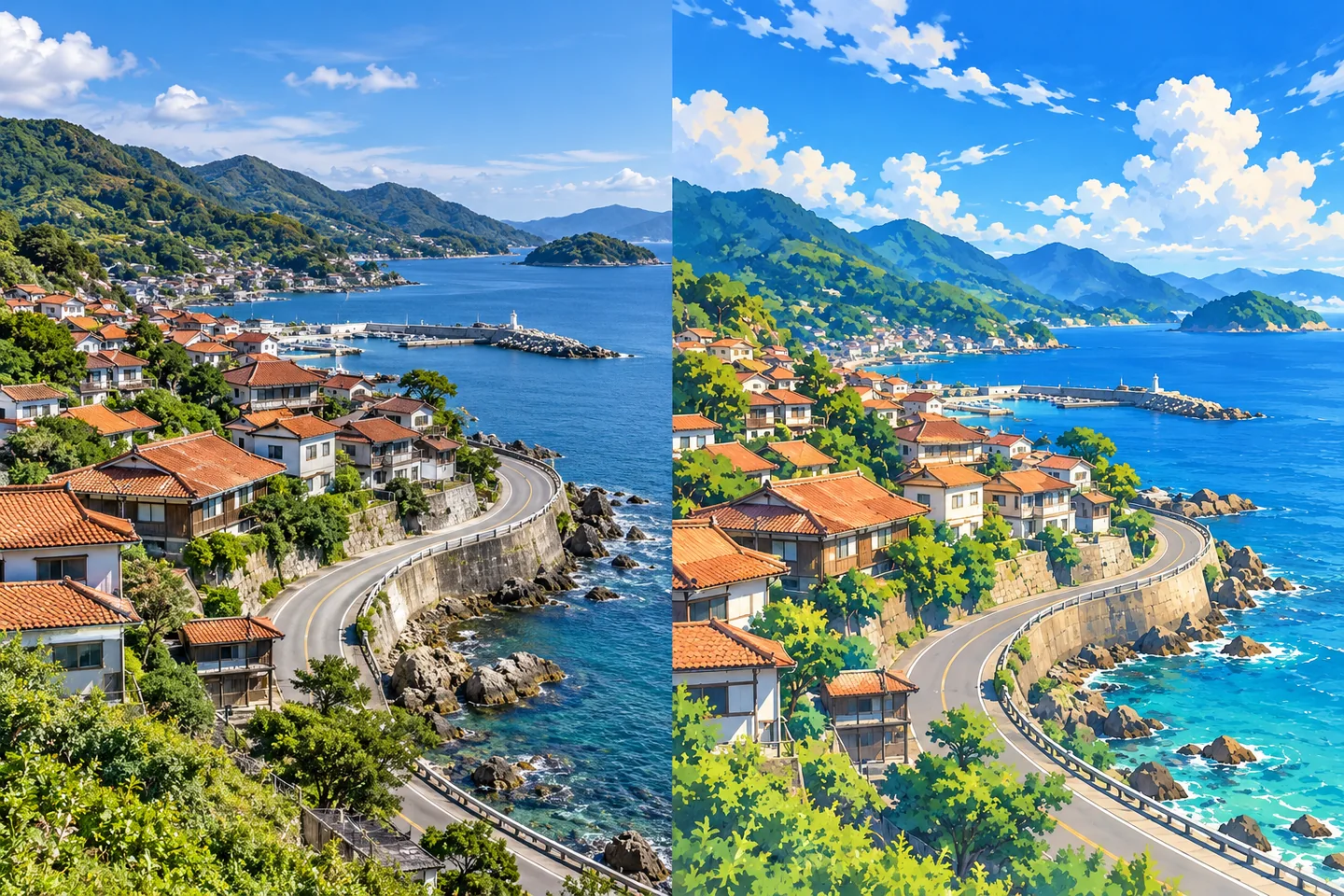
Prepare your input
- Upload one reference in Edit as JPEG, PNG, or WebP up to 15 MiB. Choose a location photo with a visible horizon or clear architectural lines; avoid heavy motion blur and obstructed landmarks.
- Pick one atmosphere and intended use, such as a quiet storyboard setting or a warm thumbnail background. Identify the perspective anchors and decide whether recognizable signs, addresses, or people should be excluded.
- Sign in and review credits. Select a currently available model and its supported ratio and quality controls; the legacy Nano Banana wording does not guarantee that a particular model is enabled.
Example prompt
Reinterpret this location photograph that I own as an original anime-style background still. Keep the main street direction, building placement, horizon, and foreground tree as compositional guides. Use painted sky gradients, restrained cel-like shadows, and a coherent late-afternoon light direction. Simplify small signage into unreadable shapes and remove private identifying details. Do not add characters, motion streaks, camera movement, subtitles, or copied studio designs. Produce one complete static background image, not an animation frame sequence or video.
Step-by-step workflow
- 1
Find the scene's perspective anchors
Locate the horizon, the dominant direction of roads or floorboards, and the main building edges. Identify a foreground shape that helps establish depth. Describe those anchors before style so the model has a spatial brief, not only a request for anime. If the reference shows private addresses or bystanders, plan to simplify or exclude them instead of making them more recognizable.
- 2
Specify a painted lighting system
Open Edit with the single reference and describe painted surfaces, shadow treatment, sky, and one time of day. Select supported model settings and submit generation manually. Avoid requests for animated camera movement or frame timing; this workspace generates a still. Keep the first treatment coherent, such as warm late-afternoon light, before testing a different atmosphere from the same original reference.
- 3
Inspect depth and background usability
Check whether windows, pavements, and roof lines agree on perspective and whether shadows point consistently. Review the sky for artifacts and the foreground for broken objects. Place the still behind a sample storyboard caption or thumbnail layout to judge useful space. If you need motion later, take an approved still into a separate animation workflow rather than expecting this page to generate a sequence.
Read the background in depth layers
A background should feel like one place even after its textures become painted. Review these layers independently, then compare their lighting. This is a composition check for a single flat image, not automatic parallax separation, animation-ready layer export, or a guarantee of geometric fidelity.
| Scene layer | Useful painted treatment | Continuity problem to catch |
|---|---|---|
| Foreground framing | Keep one readable nearby shape, such as a tree or railing, with slightly firmer edges than distant scenery. Simplify clutter that blocks the intended focal area. | Look for branches that merge with buildings, impossible railing joins, or a foreground object that changes the apparent camera height. |
| Middle-distance architecture | Use restrained edge lines and broad color planes to describe streets, doors, and windows. Retain the main directional relationships without demanding exact architectural reconstruction. | Reject inconsistent window alignment, disconnected pavement, or buildings whose angles contradict the horizon and road direction. |
| Sky and distant atmosphere | Ask for broad painted gradients and gentle separation of distant forms. Keep the light direction consistent with shadows on the nearer objects. | Check for several incompatible suns, abrupt sky bands, or warm highlights appearing on the wrong side of otherwise cool shaded structures. |
Limitations and responsible use
- This workflow makes an anime-style still background, not animation, video, motion interpolation, sound, or camera movement. The retained address describes a legacy query rather than an additional product engine.
- Perspective, architecture, and fine details may change. The output has no editable depth layers or guaranteed location fidelity; label it as an interpreted setting rather than evidence of a real place's appearance.
- Model availability and output controls vary. Safety filters may reject requests and credits are required, with no promised free quota. A Nano Banana name in the address does not guarantee model access or a specific generation result.
Common questions
Will I receive a moving clip or several animation frames?
No. The output is one still-image background. You can use it as a visual starting point in another application, but this workflow does not create motion, timing, audio, or a frame sequence. Plan those tasks separately instead of spending credits on prompts for unavailable video controls.
Do I have to use a Nano Banana model?
Use the image-editing models actually available in the workspace. The address retains an older search phrase and does not confirm that any named model is enabled for your account. Choose based on supported reference and output options, then inspect the resulting scenery rather than assuming the name guarantees a style.
How can I keep a real street recognizable?
Name the road direction, horizon, main building arrangement, and one foreground anchor. Keep decorative requests modest and compare the result with your original photo. These instructions guide composition but cannot lock geometry; avoid using the interpreted image for navigation, property documentation, or an exact location record.