Practical image workflow
AI Minecraft Skin Generator for Character Concepts
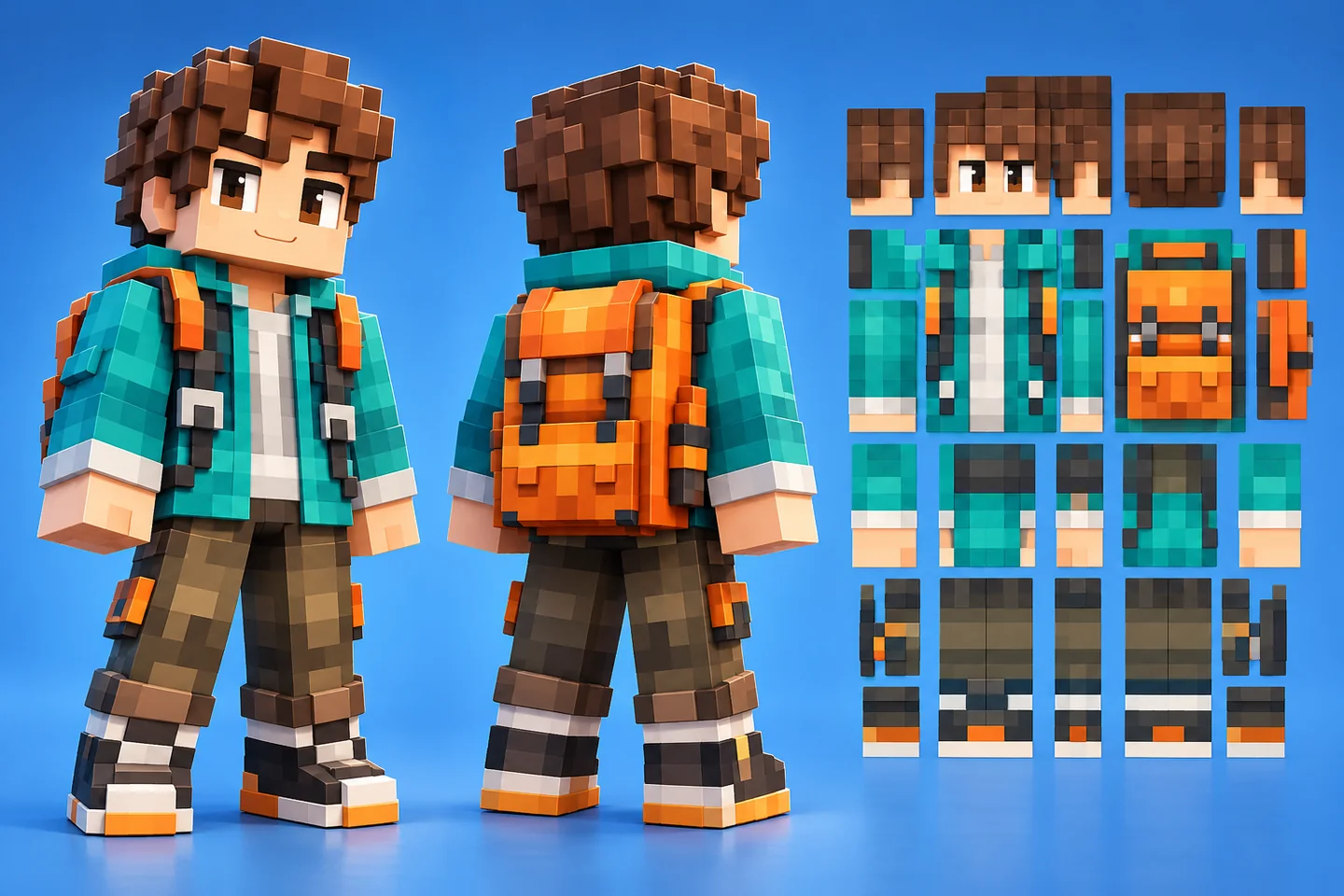
An AI Minecraft skin generator can help you invent a character's outfit before drawing the actual game skin. Here the task is a blocky forest courier with a recognizable jacket, satchel, and compact palette. Start from text on the homepage, or later use your own concept as a single reference for revision. The illustration shows a character idea, not a usable skin template. The real output is raster concept artwork; transferring it onto the appropriate Minecraft skin layout is separate manual work.
Try this workflowA prompt is prefilled; generation requires sign-in and available credits. Review model cost before submitting.
Prepare your input
- Choose a character role and three identifying outfit details that will still read at a small scale, rather than starting with intricate armor ornament.
- Decide which arm model and game edition you will eventually target using official Minecraft guidance; concept art does not determine the correct template automatically.
- Sign in on the homepage, inspect credits and supported text-to-image settings, and keep a note of the palette and clothing decisions for manual adaptation later.
Example prompt
Original Minecraft-inspired blocky forest courier character concept, full body in a neutral standing pose, facing mostly forward. Moss-green jacket, cream scarf, brown boots, one simple orange satchel strap, compact readable color palette, large square color regions and restrained pixel-like shading. Plain light background, arms slightly away from torso, no tools blocking the outfit. Character illustration only, no skin atlas, UV layout, interface, logos, or claims that the image is ready to import into a game.
Step-by-step workflow
- 1
Design for a tiny readable costume
Write the role, main garment, accent color, and one distinctive feature. Ask for a neutral pose on a plain background so you can see the torso and limbs. Avoid coats with tiny lettering, layered jewelry, and elaborate textures that will collapse when translated into a small pixel grid. Decide what makes the character recognizable without relying on dramatic lighting or a prop covering the outfit.
- 2
Generate a concept and resolve hidden details
Submit the text brief manually and compare the outfit silhouette rather than judging only the face. Check whether the satchel strap crosses the same shoulder and whether sleeves and boots form a coherent design. A generated rear view may invent new details, so record your own decision for the back. To revise the chosen concept, use edit with one JPEG, PNG, or WebP under 15 MiB.
- 3
Redraw and test in a skin workflow
Use an appropriate skin editor and the official template for your intended character model outside this tool. Manually transfer broad color regions, then check how front, back, limb sides, and overlays join. Preview the mapped skin on a rotating character before trying the relevant game's import process. Keep the AI illustration as a reference beside your template; resizing the illustration does not turn it into correctly mapped skin data.
Translate outfit ideas into manual skin decisions
Use the concept to decide what to draw, not where the game expects each pixel. The skin template and preview determine mapping; this table helps simplify the costume before that separate production step.
| Concept feature | Small-grid simplification | Manual template check |
|---|---|---|
| Moss jacket with folds and a bright inner lining. | Reduce the jacket to a dominant green field, one darker edge tone, and a short cream opening. Keep lighting gradients from becoming permanent stripes. | Check the torso sides and lower edge on a rotating preview so the jacket does not abruptly change color where different template regions meet. |
| Orange satchel strap crossing one shoulder. | Use a clear narrow diagonal with an intentional start and finish. Omit complicated buckles that would compete with the strap at game-view scale. | Draw the continuation across the back yourself and inspect shoulder transitions. The generated front illustration cannot supply reliable hidden-side mapping. |
| Scarf, gloves, and boots that identify the courier. | Choose which accessory carries the strongest accent and simplify the others. Separate boot and trouser colors enough that the legs remain readable. | Check both arms against the selected arm model, inspect under-arm regions, and test overlay visibility rather than assuming a concept silhouette matches the template. |
Limitations and responsible use
- This is a Minecraft-style character concept workflow, not an exporter for production-ready Minecraft files. It does not generate validated skin atlases, UV coordinates, 3D models, or working game packages.
- An image can suggest pixel art without obeying a true pixel grid. Outfit details and viewpoints may disagree, and reference-led revisions cannot guarantee the same proportions or exact palette across generations.
- Generation needs a signed-in account and credits; safety filters may reject requests. Use original or authorized character ideas. No promised free allowance or guaranteed compatibility replaces checking official game requirements and your manually adapted skin.
Common questions
Can I download the result and upload it directly as a skin?
The generated character illustration is not a mapped skin file. The game needs an image arranged for its character template, not a picture of a standing character. Redraw the design in an appropriate skin editor, use the correct model layout, and inspect the rotating preview before following the game's current import instructions.
Why do the front and back concepts disagree?
The model invents unseen details and does not maintain a shared 3D costume across separate images. Choose a single design rule yourself, such as where the strap crosses the back, and record it beside the front concept. During manual adaptation, consistency should come from your template drawing rather than treating every generated viewpoint as authoritative.
How do I make an elaborate costume readable in game?
Keep a few large color regions and one strong accent. Test whether the character is recognizable when the concept is viewed small. Drop details that need a close-up to explain them, then judge the actual skin in a character preview. The useful goal is a clear costume, not reproducing every painted fold from the artwork.