Practical image workflow
AI Pregnant Filter for Fictional Adult Styling
An AI pregnant filter can explore a fictional maternity-style portrait when the depicted adult explicitly wants that edit. This guide uses a modest studio concept, considering consent, clothing, posture, and respectful presentation. The illustration is a fictional styling example, not evidence of pregnancy. The actual capability is prompt-led image generation from one reference. It cannot infer pregnancy, fertility, future appearance, or health. Do not use the result to announce an unestablished real condition.
Try this workflowA prompt is prefilled; generation requires sign-in and available credits. Review model cost before submitting.
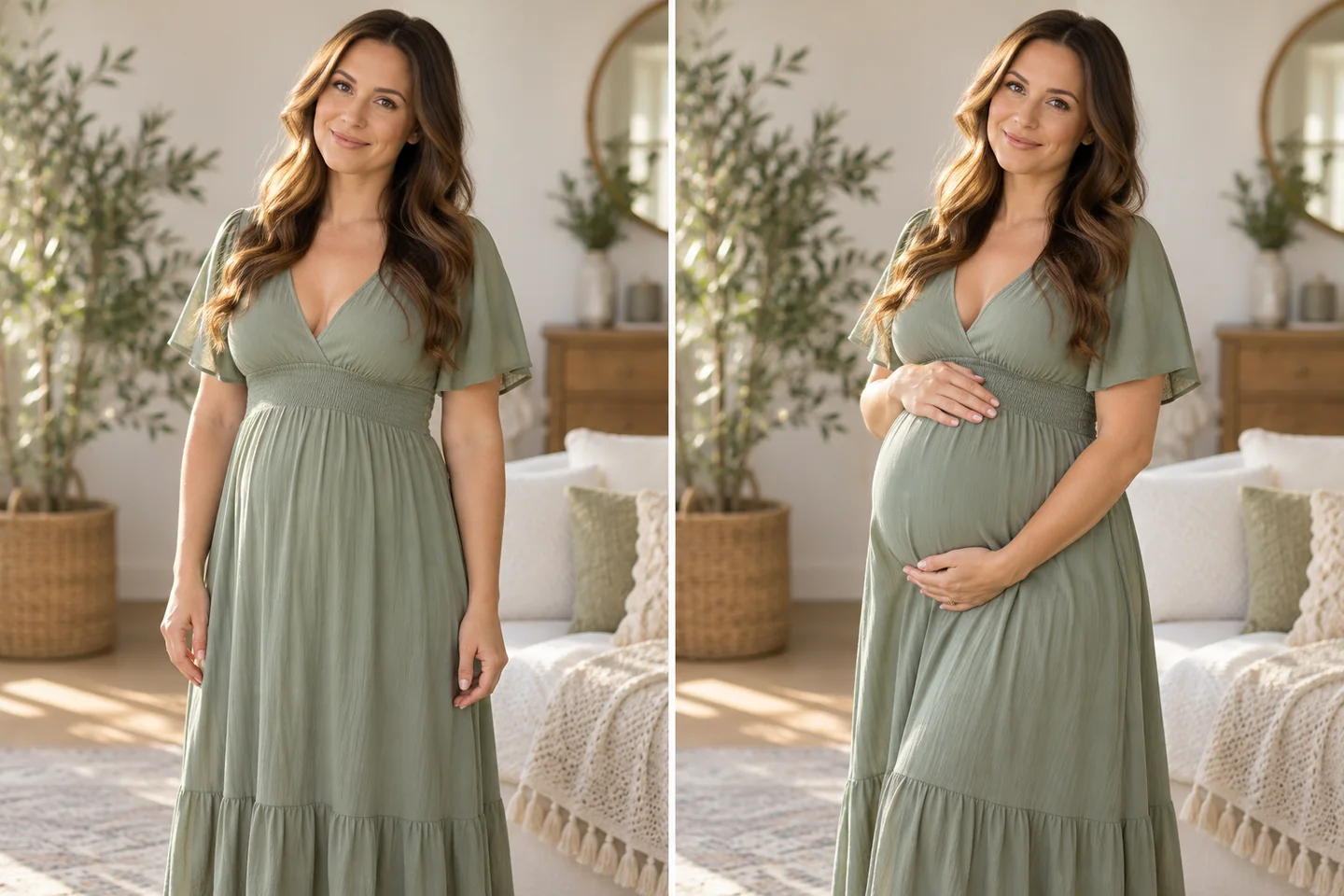
Prepare your input
- Use one authorized photograph of a consenting adult, in JPEG, PNG, or WebP under 15 MiB. Confirm agreement to this particular fictional styling, not merely to photo editing generally.
- Choose modest clothing and a simple pose with visible torso and separated hands; avoid crowded scenes, obstructed anatomy, or another person in the frame.
- Decide who will see the image and how its fictional context will be communicated. Sign in, check credits, and keep the original photograph for identity and anatomy review.
Example prompt
With the depicted adult's explicit consent, make a clearly fictional maternity-style studio portrait from this reference. Show the adult in a loose, fully covering cream dress with a gently rounded maternity silhouette, relaxed standing posture, hands resting naturally at the sides, and a warm neutral backdrop. Aim to retain recognizable facial proportions, apparent adult age, skin tone, and hairstyle. No nudity, medical imagery, ultrasound, pregnancy announcement, text, or claims about real health or future appearance.
Step-by-step workflow
- 1
Agree on the creative premise before uploading
Ask the subject whether they want this specific fictional maternity concept and whether they are comfortable with the intended audience. Do not make a surprise edit of a partner, acquaintance, or public figure. Choose clothing and mood together, and keep the request separate from any real medical situation. A plain studio setting makes it easier to inspect changes without distracting props or misleading clinical context.
- 2
Request clothing and posture together
Open the edit shortcut, upload the single reference, and describe the fully clothed silhouette, fabric, stance, and background as one coherent scene. Inspect the model's available controls and submit manually. Keep hands away from complicated overlapping positions if the source allows it. The request changes an image concept; it does not simulate a particular stage of pregnancy or predict what the subject's body would actually look like.
- 3
Review anatomy and sharing context
Compare face, neck, shoulders, hands, dress folds, and the contact between clothing and body with the original. Reject twisted arms, implausible posture, or a face that no longer resembles the consenting subject. Obtain approval of the final candidate before sharing. Label it as a fictional AI edit where viewers could mistake it for a real photograph, and avoid presenting it as a pregnancy announcement or health claim.
A respectful fictional-portrait review
The quality decision includes both the image and its context. Use these checks with the depicted adult before choosing a candidate; an aesthetically pleasing edit is not enough if its meaning is unwanted or misleading.
Specific agreement
Confirm the adult understands that the edit adds fictional maternity styling. Permission to take or generally retouch a photograph is not the same as agreement to this premise. Let the subject decide whether to keep the candidate privately, revise it, or discard it.
Comfortable clothing
Choose an ordinary, fully covering garment and check that the model has not made fabric transparent or exposed more skin than requested. Ask for a different dress shape if the silhouette feels uncomfortable rather than pressuring the subject to accept the first successful generation.
Plausible posture
Inspect the body's balance and the relationship between shoulders, arms, and hands. Clothing should have understandable folds around the fictional silhouette. If anatomy seems forced, simplify the pose or start from a clearer source instead of adding increasingly elaborate corrective instructions.
Honest distribution
Keep the fictional explanation attached to the image wherever it could be read as a real announcement. Consider whether a cropped or forwarded version would lose that explanation. Do not add ultrasound props, clinical claims, or identifying details that imply a verified medical event.
Limitations and responsible use
- This workflow does not infer pregnancy or provide medical, fertility, or body-development information. The rounded silhouette is invented, and its shape cannot predict the subject's real future appearance or circumstances.
- Use only a consenting adult and a respectful fictional premise. Prompts cannot guarantee unchanged identity, anatomy, age appearance, or clothing coverage; inspect the generated image and seek the subject's final approval.
- A signed-in account and credits are required, with no promised free quota. Safety filters may reject the request. Opening a tool handoff does not generate an image or establish consent on the subject's behalf.
Common questions
Can the filter tell whether someone is pregnant?
No. It generates a fictional visual edit from your prompt and reference, not an assessment of the person. Appearance alone is not the basis of this workflow for determining pregnancy. Do not upload another person's photograph to investigate their health or treat the generated silhouette as evidence about their body.
Can I use it for a surprise announcement image of my partner?
Discuss the specific edit and sharing plan with the adult first. A fictional maternity image can communicate a very personal claim, even if you intend it as a joke. If you are making a genuine announcement, use information and imagery the people involved have agreed to share rather than letting an invented image establish the claim.
Why do hands or dress folds look strange?
The model is generating new anatomy and fabric rather than applying a measured body simulation. Start with a clearer stance, request separated hands and simpler clothing, and inspect the next candidate closely. If important features remain wrong, discard it. More detailed wording cannot guarantee anatomically accurate or identity-preserving results.