Practical image workflow
AI Attractiveness Test: Explore Portrait Styling
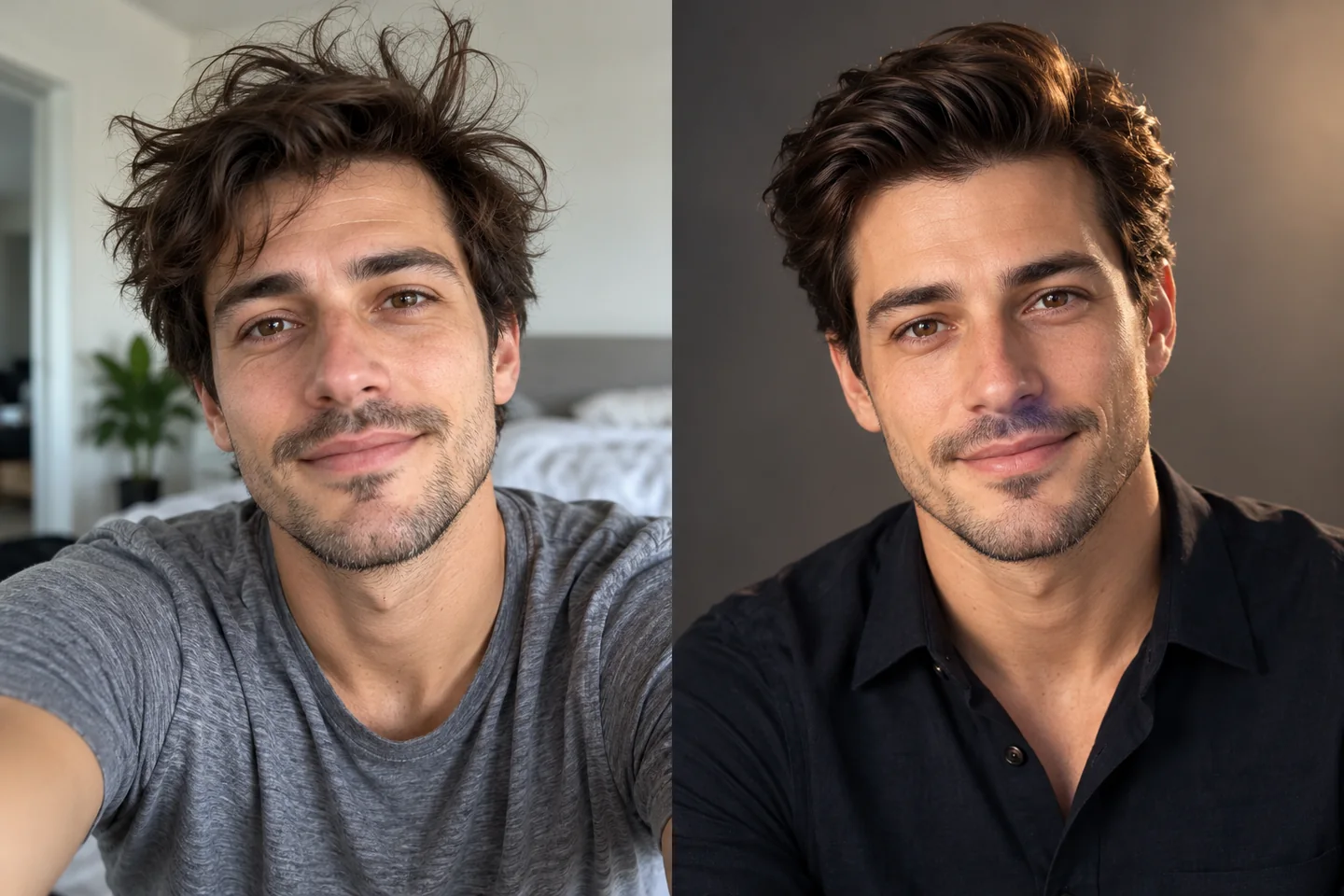
People searching for an AI attractiveness test often want to understand why one portrait feels more flattering than another. This workflow explores subjective presentation choices rather than scoring your face. Start with your own photograph or a consenting adult's portrait, then compare lighting, framing, and background treatments against a specific purpose such as a profile photo. The illustration is a styling concept, not an assessment or verified transformation. The actual capability is prompt-led image adjustment, with no beauty score, ranking, or judgment of personal worth.
Try this workflowA prompt is prefilled; generation requires sign-in and available credits. Review model cost before submitting.
Prepare your input
- Use one clear, evenly exposed portrait you are allowed to edit, in JPEG, PNG, or WebP under 15 MiB; avoid screenshots of someone else's profile.
- Choose a concrete goal, such as a friendly introduction photo, and decide whether the current problem is distracting light, clutter, or framing.
- Keep an untouched original for comparison. Sign in, check available credits, and use the adjust shortcut with one reference rather than expecting a face-analysis tool.
Example prompt
Adjust this consenting adult's portrait into a relaxed professional profile image. Request soft window light, a neutral warm-gray background, natural skin texture, and balanced contrast. Aim to retain the person's visible facial proportions, age, skin tone, hairstyle, and expression without reshaping features or beautifying their body. Keep clothing modest and ordinary. Do not add ratings, scores, comparison labels, or claims about attractiveness. Treat the result as an edited portrait concept.
Step-by-step workflow
- 1
Choose a comparison you can actually judge
Write a neutral observation about the photograph: overhead lighting creates strong eye shadows, or the background competes with the face. Turn that observation into an editing request. Avoid language that treats facial shape, age, or skin tone as a defect. Decide the display size in advance, because a portrait that feels balanced as a large image may read differently in a small circular avatar.
- 2
Request a modest presentation change
Upload the portrait to the image-to-image editor and choose adjust. Paste the prompt, inspect the available model controls, and submit manually when the brief is ready. Try a lighting change before adding wardrobe, makeup, or expression changes. The shortcut supplies a prompt-led starting point; it is not a deterministic retouching brush and does not measure facial symmetry or evaluate how attractive someone is.
- 3
Inspect for recognition and comfort
Compare the result with the original at a useful size, then enlarge the eyes, hairline, skin texture, and jaw. Check whether the person still feels recognizable and comfortable with the presentation. Discard a candidate that changes age or facial structure even if its light looks polished. Ask the subject to approve the selected edit before sharing, and describe it as edited when that context matters.
Compare the photograph, not the person
These observations describe choices a photographer or editor can change. They are not beauty criteria. Judge whether a treatment serves the portrait's purpose and feels acceptable to the person depicted.
| Photo observation | Prompt experiment | Decision after inspection |
|---|---|---|
| Overhead light leaves the eye area dark while the forehead is bright. | Request broad window light from slightly above eye level, with gentle facial shadows and visible natural texture. | Check that eyes remain shaped like the original and the face has not been flattened into uniform plastic-looking skin. |
| A patterned wall takes attention away from the expression in a small avatar. | Ask for a simple warm-gray background while keeping an ordinary photographic setting and understated contrast. | Inspect hair edges and glasses for invented outlines. Choose a quieter background only if the subject stays visually distinct. |
| A tight crop makes the profile picture feel tense or cuts through the hairstyle. | Request a relaxed head-and-shoulders composition with a little breathing room and no change to the person's apparent age. | Compare the final crop in its destination shape. Newly generated shoulders or clothing can be inaccurate and need separate review. |
Limitations and responsible use
- No objective attractiveness test, facial rating, or psychological assessment happens here. Presentation preferences vary across people and contexts; an edited photograph cannot establish someone's health, character, or social value.
- Requests to retain facial proportions guide generation but cannot guarantee identity preservation. The model can alter features, skin texture, or apparent age; careful comparison and the subject's approval remain necessary.
- This is a signed-in, credits-based workflow without a promised free quota. Safety filters may reject requests. Avoid humiliating comparisons, unsolicited edits of other people, or using the result as deceptive identity evidence.
Common questions
Why is there no numerical attractiveness result?
A number would imply a measurement this workflow does not perform. It generates a portrait variation from your reference and words. A more useful question is whether the lighting communicates the intended mood and whether the person likes the edit. Keep comparisons about the image rather than assigning a rank to someone's appearance.
Can I compare two lighting styles without changing my features?
You can request that and use the same original separately for each variation. Keep the framing and background instructions similar so lighting is the main difference. Still inspect facial proportions and texture in both results. There is no locked identity setting, and repeatedly editing an already altered portrait can move it further from the original.
Is this suitable for choosing a professional profile picture?
It can help explore a background or lighting direction. Prefer a version that is recognizable, comfortable, and appropriate to the role. For a final photograph that must faithfully represent you, consider taking a new picture with the lighting you liked. Do not treat a highly altered candidate as evidence of a real photo session.